To give your Mac a Japanese Ukiyo-e look, describe it in DesignMyMac — for example “A Japanese ukiyo-e woodblock desktop: Hokusai-style waves, indigo and vermilion, washi-paper widgets”. It researches the style, proposes three directions with a painted wallpaper and icon sample, and applies your choice to the wallpaper, app icons, folders, Dock, widgets and windows together. Every original is backed up and one click restores it.
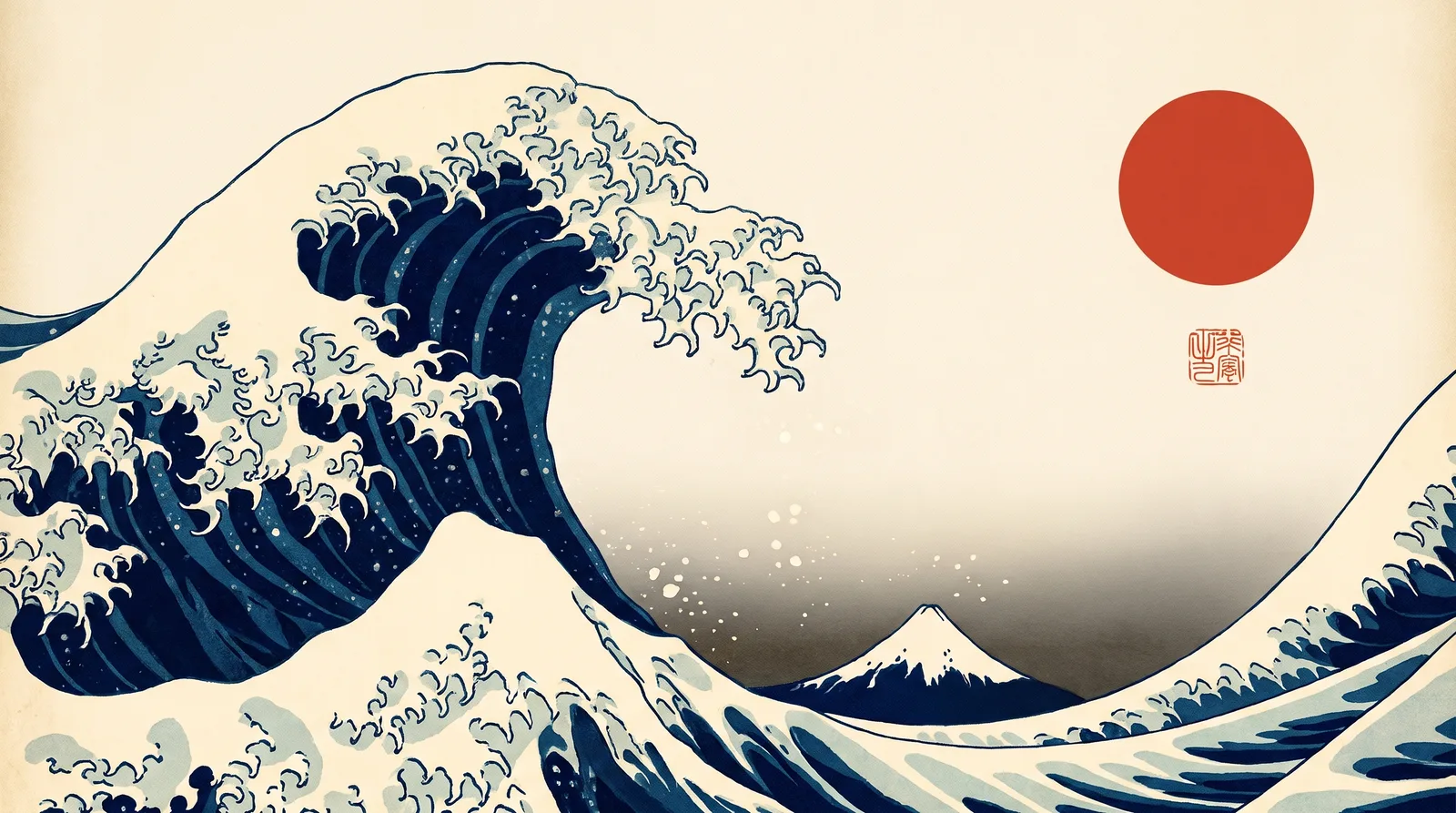
Great Wave Indigo — painted by DesignMyMac from the prompt below.
Prompt
“A Japanese ukiyo-e woodblock desktop: Hokusai-style waves, indigo and vermilion, washi-paper widgets”
You want a ukiyo-e woodblock desktop: Hokusai waves, indigo with vermilion accents, and widgets that look like washi paper. I'm offering three directions, each drawn from a different part of the woodblock tradition.
Three directions DesignMyMac proposed
Direction A
Great Wave Indigo
Deep Prussian-blue surf under a pale dawn sky, with one vermilion seal as the only warm note.
Grounded in: Hokusai Great Wave woodblock
Wallpaper
Hokusai-style curling wave with claw-like foam fingers in Prussian blue and indigo, cream sky with bokashi gradient, small distant Fuji, a vermilion sun disc and seal stamp, wave on the left, empty sky on the right.
App icons & Dock
Washi-paper tiles with woodblock keyline outlines, indigo ink glyphs on cream, and a small vermilion seal dot on the active app.
Folders
Indigo folded-paper folders with a cream label strip and a small vermilion hanko stamp.
Widgets
Washi cards with visible fibres and a deep indigo serif font: clock, calendar, weather, checklist. A vermilion seal marks the date.
Windows
Cream washi windows with thin indigo borders, an editorial header and vermilion outline selection.
A quiet rainy bridge scene at dusk, with dark ink blue and glowing lantern vermilion.
Grounded in: Hiroshige Ohashi rain print
Wallpaper
Hiroshige-style slanting rain lines over a wooden bridge in Prussian blue, with a dark gradient sky, tiny rafts on the river, and vermilion lantern glows lower right. Open dark sky at top.
App icons & Dock
Stencil-cut woodblock silhouettes in pale blue-grey on dark indigo squares, with vermilion lantern-colour highlights.
Folders
Dark indigo folders with fine slanted rain-line texture and a pale blue tab.
Widgets
Dark indigo cards with pale rule lines and a mono-weight font: clock, weather, events, now playing. Vermilion lantern accents.
Windows
Dark indigo glass windows with soft edges and a vermilion selection highlight.
Flat, graphic Edo textile patterns in a playful stack: seigaiha waves, asanoha stars and a red sun.
Grounded in: Edo-period seigaiha and komon pattern prints
Wallpaper
Flat seigaiha concentric-wave pattern in indigo and cream across the lower half, with a large vermilion sun circle and a band of gold-ochre cloud (kasumi) above. Plain cream area at the top right.
App icons & Dock
Bold flat katagami stencil shapes in indigo on cream, with vermilion and ochre fill blocks.
Folders
Indigo folders printed with an asanoha star pattern and a vermilion edge band.
Widgets
One printed washi card in a 2-column grid: date, calendar, progress ring for the year, habits. Condensed display type, vermilion headings.
Windows
Solid cream windows with native compact chrome, indigo text and filled vermilion selection.
Wallpaper — an original painting for every display, with optional motion.
App icons & Dock — matching icons for your apps in the DesignMyMac Dock, in its own colour.
Folders — every folder in your home in the same style, and new ones as you make them.
Widgets — clocks, calendars, weather and more, designed to match.
Windows — the DesignMyMac Files and Apps windows in your palette.
Questions
How do I make my Mac look Japanese Ukiyo-e?
To give your Mac a Japanese Ukiyo-e look, describe it in DesignMyMac — for example “A Japanese ukiyo-e woodblock desktop: Hokusai-style waves, indigo and vermilion, washi-paper widgets”. It researches the style, proposes three directions with a painted wallpaper and icon sample, and applies your choice to the wallpaper, app icons, folders, Dock, widgets and windows together. Every original is backed up and one click restores it.
What colours suit a Japanese Ukiyo-e Mac desktop?
A strong starting palette is #14284b, #1f4a7a, #efe3c8, #d9432b, led by the accent #d9432b. DesignMyMac uses it across your wallpaper, icons, folders, widgets and windows.
What widgets fit a Japanese Ukiyo-e setup?
Washi cards with visible fibres and a deep indigo serif font: clock, calendar, weather, checklist. A vermilion seal marks the date.
Is DesignMyMac free?
You can start for free. Designing with AI has a daily limit per account.
Which Macs does it work on?
Macs with Apple silicon running macOS 14 Sonoma or later. You can also design in your browser at designmymac.com/studio.
Does it change my files?
No. DesignMyMac only changes how things look — wallpaper, icons, folders' appearance, the Dock, widgets and window styling.

 MinimalBare Plaster Wall
 CyberpunkRain Alley 2049
 Retro 80s SynthwaveHorizon Run
 CottagecoreMeadow at Hay Time
 Dark AcademiaReading Room at Last Candle
 Pastel AestheticGelato Counter