designmymac.
Style

Cyberpunk Mac desktop theme

To give your Mac a Cyberpunk look, describe it in DesignMyMac — for example “A cyberpunk neon city desktop: magenta and cyan neon, chrome icons, glitchy HUD widgets”. It researches the style, proposes three directions with a painted wallpaper and icon sample, and applies your choice to the wallpaper, app icons, folders, Dock, widgets and windows together. Every original is backed up and one click restores it.

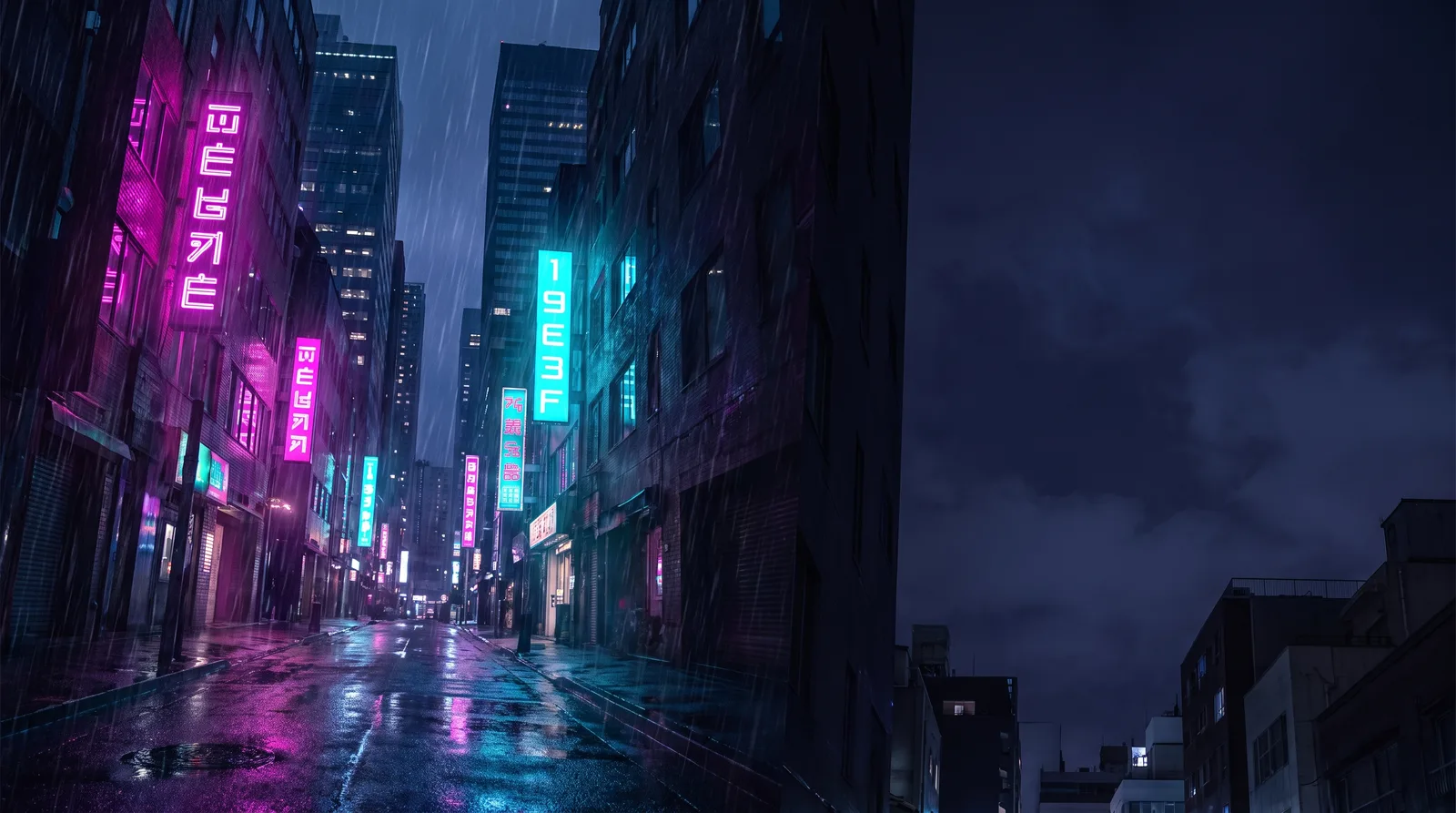
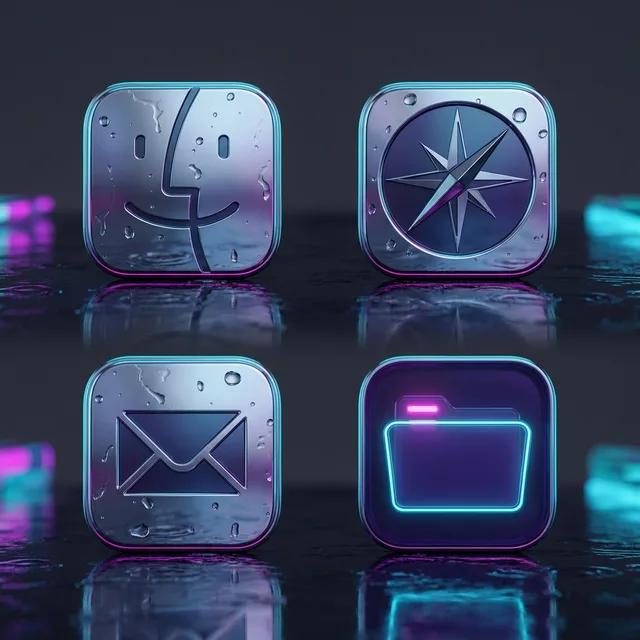
Rain Alley 2049: an original Cyberpunk Mac wallpaper designed by DesignMyMacCyberpunk icon sample: Finder, Safari, Mail and a folder
Rain Alley 2049 — painted by DesignMyMac from the prompt below.
Prompt

“A cyberpunk neon city desktop: magenta and cyan neon, chrome icons, glitchy HUD widgets”

Design this for my Mac

You want a cyberpunk neon city with magenta and cyan light, chrome icons and glitchy HUD widgets. I'm offering three different scenes: a rain-soaked street, a rooftop skyline at dusk, and a retro arcade-terminal take.

Three directions DesignMyMac proposed

Direction A

Rain Alley 2049

Wet night street, neon signs smeared across puddles, heavy and cinematic.

Grounded in: Blade Runner-style rainy neon street

Wallpaper
Narrow alley at night, tall towers with vertical magenta and cyan neon kanji signs, rain streaks, reflections in wet asphalt, dark open sky on the right for icons.
App icons & Dock
Polished chrome rounded-square icons with a thin cyan edge glow and magenta reflection on the lower curve.
Folders
Dark violet translucent folders with a cyan neon outline and a small magenta tab light.
Widgets
One right-side glass HUD card with a flip clock, system stats, weather and a nowPlaying bars block; mono font, cyan text, magenta dividers.
Windows
Floating frosted glass in deep indigo with thin cyan borders and a magenta selection highlight.
Design “Rain Alley 2049”
Direction B

Skyline Scanline

High rooftop view over a megacity at dusk, a clean synthetic gradient with a glitch overlay.

Grounded in: Vaporwave-meets-cyberpunk rooftop skyline

Wallpaper
Rooftop view of a dense megacity skyline under a purple-to-magenta dusk sky, a huge cyan holographic grid sun, horizontal scanline glitch bands, towers silhouetted in indigo.
App icons & Dock
Flat stencil icons in bold cyan and white on dark violet tiles with offset magenta shadow, like a misregistered print.
Folders
Solid indigo folders with a hard magenta offset shadow and a cyan stencil label strip.
Widgets
A three-column dashboard card with a digital clock, a ring progress for the day, a countdown, a calendar and a ticker; condensed font, solid dark panels with cyan edges.
Windows
Solid compact native windows in deep indigo with cyan accents and filled cyan selection.
Design “Skyline Scanline”
Direction C

Terminal District

Pixel-grid arcade terminal, scrappy and playful with green-free neon.

Grounded in: 8-bit cyberpunk arcade screen

Wallpaper
Pixel-art night city in 16-bit style, stacked lit windows in cyan and yellow, magenta billboards, a lone figure under a neon sign, pixel rain, large black sky area on the left.
App icons & Dock
Chunky pixel enamel icons with chrome-grey bevels and magenta and cyan highlights on black tiles.
Folders
Magenta enamel pixel folders with a cyan pixel tab and a hard black outline.
Widgets
Pixel-framed cards with a habit tracker, checklist, reminders and a battery block; pixel font, magenta headings, yellow checkmarks.
Windows
Floating solid editorial windows in near-black with magenta outline selection and a cyan header rule.
Design “Terminal District”

What changes on your Mac

Questions

How do I make my Mac look Cyberpunk?

To give your Mac a Cyberpunk look, describe it in DesignMyMac — for example “A cyberpunk neon city desktop: magenta and cyan neon, chrome icons, glitchy HUD widgets”. It researches the style, proposes three directions with a painted wallpaper and icon sample, and applies your choice to the wallpaper, app icons, folders, Dock, widgets and windows together. Every original is backed up and one click restores it.

What colours suit a Cyberpunk Mac desktop?

A strong starting palette is #0a0716, #1b1035, #ff2bd6, #19e3ff, #c9d3e6, led by the accent #ff2bd6. DesignMyMac uses it across your wallpaper, icons, folders, widgets and windows.

What widgets fit a Cyberpunk setup?

One right-side glass HUD card with a flip clock, system stats, weather and a nowPlaying bars block; mono font, cyan text, magenta dividers.

Is DesignMyMac free?

You can start for free. Designing with AI has a daily limit per account.

Which Macs does it work on?

Macs with Apple silicon running macOS 14 Sonoma or later. You can also design in your browser at designmymac.com/studio.

Does it change my files?

No. DesignMyMac only changes how things look — wallpaper, icons, folders' appearance, the Dock, widgets and window styling.
More styles

Scandinavian Mac desktopScandinavianBirch Veneer StudioBauhaus Mac desktopBauhausDessau PosterArt Deco Mac desktopArt DecoChrysler SpireY2K Mac desktopY2KBubble Bath ChromeForest Mac desktopForestFog Between PinesOcean Mac desktopOceanShallows From Above