To give your Mac a Dark Academia look, describe it in DesignMyMac — for example “A dark academia desktop: candlelit library, leather and brass, serif widgets, deep brown and gold”. It researches the style, proposes three directions with a painted wallpaper and icon sample, and applies your choice to the wallpaper, app icons, folders, Dock, widgets and windows together. Every original is backed up and one click restores it.
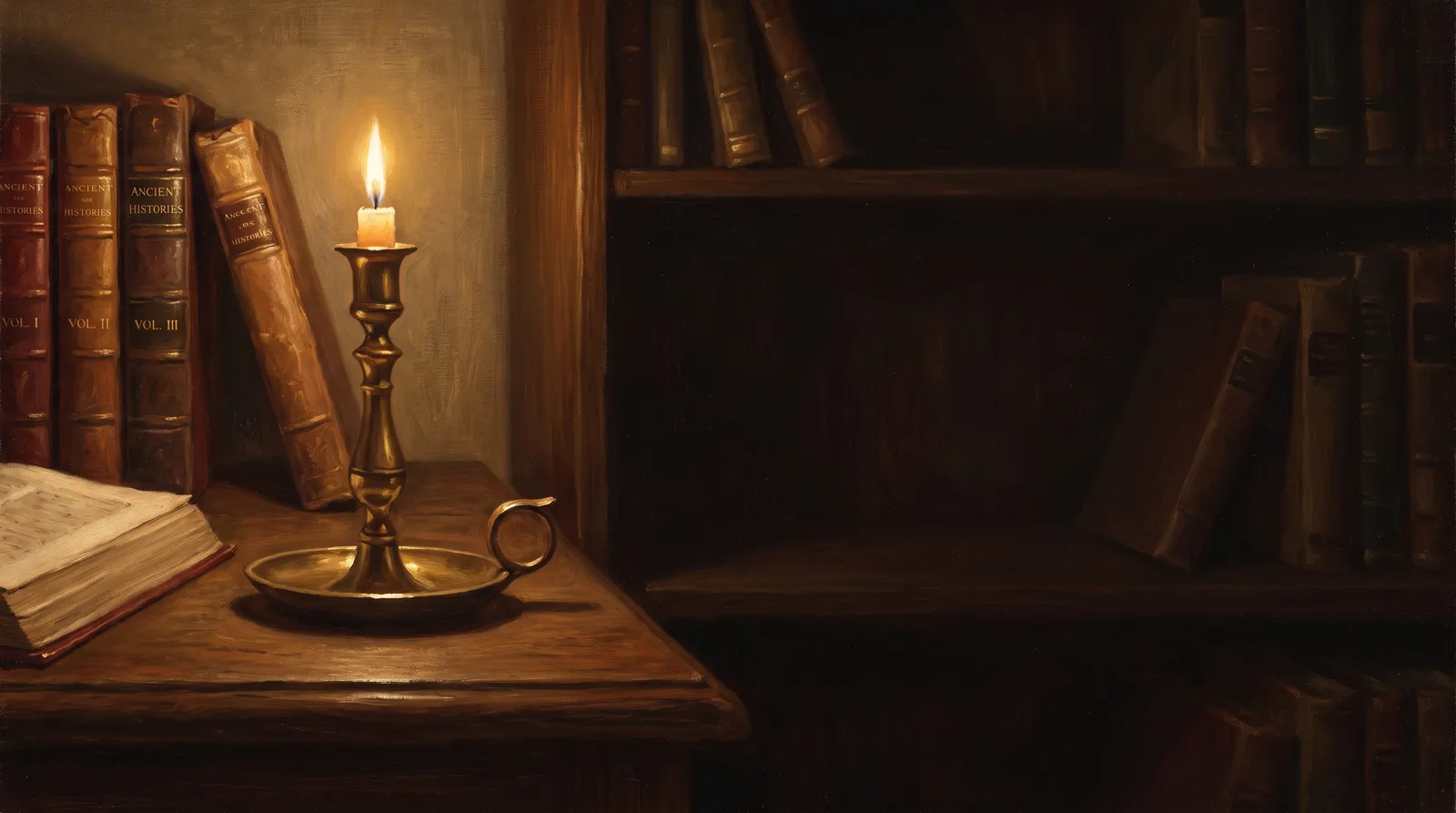
Reading Room at Last Candle — painted by DesignMyMac from the prompt below.
Prompt
“A dark academia desktop: candlelit library, leather and brass, serif widgets, deep brown and gold”
Dark academia: candlelit library, leather and brass, serif type, deep brown and gold. Three directions use different scenes and materials, and each leads with a different layer.
Three directions DesignMyMac proposed
Direction A
Reading Room at Last Candle
A silent private library after midnight, one flame left, warm gold on dark leather.
Grounded in: Dutch candlelit interior painting
Wallpaper
Wallpaper-led: oil-painted library alcove in the Dutch candlelit manner, a single brass candlestick on an oak desk, leather spines in oxblood and umber, soft gold glow on the left, dark open space on the right.
App icons & Dock
Embossed leather-bound book-cover tiles in deep brown with gold-foil glyphs, rounded rectangle silhouette, stitched edges.
Folders
Tan-to-brown leather folders with brass corner caps and a gold-stamped ribbon bookmark tab.
Widgets
One paper-textured card in parchment cream with a serif font: date, month calendar, a quote of the day, and a checklist headed 'Reading list'.
Windows
Editorial floating windows in solid dark walnut brown, serif titles, thin gold outline selection.
A scholar's observatory desk: instruments, star charts and engraved metal, cool shadow with brass light.
Grounded in: Antique astronomical instruments and engraved star charts
Wallpaper
A brass armillary sphere and orrery on a dark mahogany table, engraved constellation chart pinned behind, pools of amber lamplight, dark negative space top right for widgets.
App icons & Dock
Icon-led: polished antique brass medallions with engraved line glyphs, circular silhouette, dark brown enamel inlay.
Folders
Brushed brass plate folders with engraved compass-rose emblem and dark umber body.
Widgets
Solid dark-brown card, serif font: analog clock, sky block for moon phase and sunset, countdown to a deadline, in gold engraved style.
Hidden stacks and old bookbinding: marbled paper, wax seals, ink and ribbon, deep and rich.
Grounded in: Bookbinder's marbled endpapers and wax seal ephemera
Wallpaper
Folio-style wallpaper of swirled marbled endpaper in chestnut, oxblood and gold veining, with a torn parchment edge, a dark red wax seal and a faint pressed fern in one corner.
App icons & Dock
Folder-led: cut-paper collage tiles with marbled paper fills, gold-inked pressed-leaf glyphs, soft square silhouette.
Folders
Marbled-paper covered folders in oxblood and chestnut with a cloth spine and small gold wax-seal label.
Widgets
Collage card with torn parchment edges, serif font: weather, habit tracker for daily reading, a note block, and a quote.
Windows
Native solid windows in deep chestnut brown, compact header, gold filled selection.
Wallpaper — an original painting for every display, with optional motion.
App icons & Dock — matching icons for your apps in the DesignMyMac Dock, in its own colour.
Folders — every folder in your home in the same style, and new ones as you make them.
Widgets — clocks, calendars, weather and more, designed to match.
Windows — the DesignMyMac Files and Apps windows in your palette.
Questions
How do I make my Mac look Dark Academia?
To give your Mac a Dark Academia look, describe it in DesignMyMac — for example “A dark academia desktop: candlelit library, leather and brass, serif widgets, deep brown and gold”. It researches the style, proposes three directions with a painted wallpaper and icon sample, and applies your choice to the wallpaper, app icons, folders, Dock, widgets and windows together. Every original is backed up and one click restores it.
What colours suit a Dark Academia Mac desktop?
A strong starting palette is #1e130d, #3a2416, #6b4429, #c9a24b, #e8d5a8, led by the accent #c9a24b. DesignMyMac uses it across your wallpaper, icons, folders, widgets and windows.
What widgets fit a Dark Academia setup?
One paper-textured card in parchment cream with a serif font: date, month calendar, a quote of the day, and a checklist headed 'Reading list'.
Is DesignMyMac free?
You can start for free. Designing with AI has a daily limit per account.
Which Macs does it work on?
Macs with Apple silicon running macOS 14 Sonoma or later. You can also design in your browser at designmymac.com/studio.
Does it change my files?
No. DesignMyMac only changes how things look — wallpaper, icons, folders' appearance, the Dock, widgets and window styling.

 MonochromeSumi Brushwork
 GlassmorphismAurora Pane
 Classic Mac OSPlatinum Finder Day
 Pixel ArtCartridge Valley
 Hacker TerminalPhosphor Bunker
 BohoPampas at Golden Hour