To give your Mac a Monochrome look, describe it in DesignMyMac — for example “A monochrome desktop: pure black and white, ink textures, sharp line icons, high-contrast widgets”. It researches the style, proposes three directions with a painted wallpaper and icon sample, and applies your choice to the wallpaper, app icons, folders, Dock, widgets and windows together. Every original is backed up and one click restores it.
Sumi Brushwork — painted by DesignMyMac from the prompt below.
Prompt
“A monochrome desktop: pure black and white, ink textures, sharp line icons, high-contrast widgets”
You want strict black and white with ink texture, thin line icons and high-contrast widgets. I'm offering three monochrome directions that differ in medium, era and which layer leads.
Three directions DesignMyMac proposed
Direction A
Sumi Brushwork
One wet ink stroke on rice paper. Quiet, spacious, handmade.
Grounded in: Japanese sumi-e ink wash
Wallpaper
Sumi-e ink wash on off-white paper: one bold enso-like brush arc in black with dry-brush bristle streaks and soft grey bleed, wide empty space on the left.
App icons & Dock
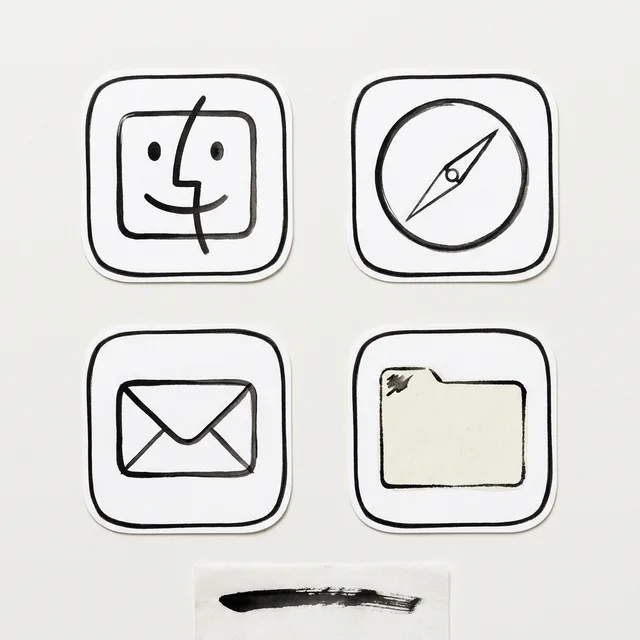
Thin black brush-edged outline icons on white tiles, single-weight strokes, rounded-square silhouette with a hairline border.
Folders
Off-white paper folders with a black ink-stamp outline and a small hand-inked tab mark.
Widgets
Black-on-white paper cards: large serif clock, month calendar, one daily quote, and a ring progress for the day. Hairline black borders.
Windows
Editorial floating windows in warm white, outline selection, thin black rules under serif headers.
Direction B
Halftone Newsprint
Photocopied zine in hard black dots. Loud, graphic, tactile.
Grounded in: 1970s photocopy zine halftone
Wallpaper
Black background with a giant white halftone-dot sphere half off the right edge, coarse photocopy grain and torn-paper edge at the bottom, no text.
App icons & Dock
White 1-bit pixel-line glyphs on black squares, 2px strokes, hard corners, inverted tile on hover.
Folders
Solid black folders with white halftone shading on the tab and a crisp white outline.
Widgets
One dashboard card in 2 columns: bold condensed clock, checklist, week progress bar, and a counter. Pure white on black, no glass.
Windows
Native solid dark windows, compact headers, filled white selection with black text.
Direction C
Blueprint Negative
Architect's drafting sheet in white line on black. Precise and technical.
Grounded in: Technical drafting, white-on-black line art
Wallpaper
Black sheet with fine white isometric line drawing of a spiral staircase, thin construction grid, dimension ticks and compass arcs, faint chalk-dust texture, empty lower right.
App icons & Dock
Sharp 1px white line icons with chrome-edged black glass tiles, geometric silhouettes, no fill.
Folders
Dark charcoal folders drawn as wireframe outlines with a white dimension line across the tab.
Widgets
Frosted black glass cards with white mono type: digital clock, world clock, system stats, and a calendar. Thin white borders, high contrast.
Windows
Floating dark glass windows, compact headers, hairline white edges, filled selection.
What changes on your Mac
Wallpaper — an original painting for every display, with optional motion.
App icons & Dock — matching icons for your apps in the DesignMyMac Dock, in its own colour.
Folders — every folder in your home in the same style, and new ones as you make them.
Widgets — clocks, calendars, weather and more, designed to match.
Windows — the DesignMyMac Files and Apps windows in your palette.
Questions
How do I make my Mac look Monochrome?
To give your Mac a Monochrome look, describe it in DesignMyMac — for example “A monochrome desktop: pure black and white, ink textures, sharp line icons, high-contrast widgets”. It researches the style, proposes three directions with a painted wallpaper and icon sample, and applies your choice to the wallpaper, app icons, folders, Dock, widgets and windows together. Every original is backed up and one click restores it.
What colours suit a Monochrome Mac desktop?
A strong starting palette is #f4f2ee, #111111, #8a8a88, #ffffff, led by the accent #111111. DesignMyMac uses it across your wallpaper, icons, folders, widgets and windows.
What widgets fit a Monochrome setup?
Black-on-white paper cards: large serif clock, month calendar, one daily quote, and a ring progress for the day. Hairline black borders.
Is DesignMyMac free?
You can start for free. Designing with AI has a daily limit per account.
Which Macs does it work on?
Apple silicon and Intel Macs running macOS 14 Sonoma or later. Download it free at designmymac.com/download.
Does it change my files?
No. DesignMyMac only changes how things look — wallpaper, icons, folders' appearance, the Dock, widgets and window styling.

 Pixel ArtCartridge Valley
 Hacker TerminalPhosphor Bunker
 BohoPampas at Golden Hour
 MatchaChawan Glaze
 Desert DunesRipple Hour
 SolarpunkCanopy Terraces