To give your Mac a Spring Blossom look, describe it in DesignMyMac — for example “A spring cherry blossom desktop: pale pink sakura petals, soft greens, delicate floral icons”. It researches the style, proposes three directions with a painted wallpaper and icon sample, and applies your choice to the wallpaper, app icons, folders, Dock, widgets and windows together. Every original is backed up and one click restores it.
Hanami Riverbank — painted by DesignMyMac from the prompt below.
Prompt
“A spring cherry blossom desktop: pale pink sakura petals, soft greens, delicate floral icons”
You want a spring sakura desktop with pale pink petals, soft greens and delicate floral icons. I'll offer three different ways to get there: a painted scene, a printed botanical look, and a calm paper-and-tea look.
Three directions DesignMyMac proposed
Direction A
Hanami Riverbank
Late-morning light under blossom boughs, a still green river carrying drifting petals.
Grounded in: Japanese hanami watercolor
Wallpaper
Wallpaper-led: soft watercolor of cherry boughs in pale pink arching over a sage-green river, floating petals on the water, wide open pale sky on the left for icons.
App icons & Dock
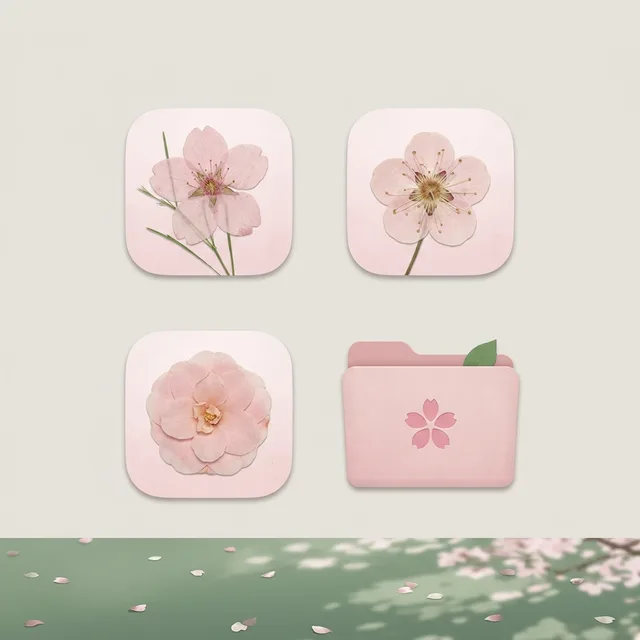
Botanical family: single sakura, plum and camellia blooms in pressed-flower style, on rounded pale pink tiles with fine green stems.
Folders
Blush pink folders with a small five-petal sakura stamped on the front and a tiny green leaf tab.
Widgets
One collage card on the right: weather for Kyoto, month calendar, a sky block for sunrise, and a checklist. Soft pink paper cutouts with sage borders.
Windows
Frosted glass in warm blush white with thin sage-green outlines and a compact header.
Direction B
Sakura Woodblock
Crisp, graphic spring: flat ink-and-colour print with bold blossoms on indigo-green ground.
Grounded in: Ukiyo-e woodblock print
Wallpaper
Hiroshige-style woodblock of a single gnarled cherry branch with pink five-petal blossoms across a deep pine-green gradient sky, scattered petals, cream paper grain, large empty area at right.
App icons & Dock
Stencil family: one-colour blossom and leaf glyphs cut like carved blocks, pink on cream and cream on pine green.
Folders
Soft moss-green folders with a cream label strip and a carved pink blossom mark.
Widgets
Printed-look card with serif type: a large date, a progress ring for the year, a quote block of haiku, and a day-by-day habit tracker.
Windows
Editorial floating windows in cream paper with outline selection and a serif header.
Direction C
Tea House Morning
Quiet, warm and calm: paper screens, a cup of tea and one blossom twig in soft window light.
Grounded in: Wabi-sabi tea house still life
Wallpaper
Photographic still life: shoji paper screen lit by morning sun, a ceramic cup of green tea and one cherry blossom twig in a pale celadon vase, soft shadows, calm space on top.
App icons & Dock
Paper family: delicate washi-paper icons with tiny embossed blossoms and fine leaf lines in blush and matcha.
Folders
Washi-paper folders in dusty rose with a torn-edge cream label and a pressed petal.
Widgets
Paper cards in a column on the left: a clock in word style, a reminders block, a now playing block, and a small note. Serif type, soft shadows.
Windows
Native solid windows in warm cream with a compact header and a filled dusty rose selection.
What changes on your Mac
Wallpaper — an original painting for every display, with optional motion.
App icons & Dock — matching icons for your apps in the DesignMyMac Dock, in its own colour.
Folders — every folder in your home in the same style, and new ones as you make them.
Widgets — clocks, calendars, weather and more, designed to match.
Windows — the DesignMyMac Files and Apps windows in your palette.
Questions
How do I make my Mac look Spring Blossom?
To give your Mac a Spring Blossom look, describe it in DesignMyMac — for example “A spring cherry blossom desktop: pale pink sakura petals, soft greens, delicate floral icons”. It researches the style, proposes three directions with a painted wallpaper and icon sample, and applies your choice to the wallpaper, app icons, folders, Dock, widgets and windows together. Every original is backed up and one click restores it.
What colours suit a Spring Blossom Mac desktop?
A strong starting palette is #fdf1f3, #f7cfdb, #b9d8b0, #6f9f7a, #4a5a4e, led by the accent #f4a9c0. DesignMyMac uses it across your wallpaper, icons, folders, widgets and windows.
What widgets fit a Spring Blossom setup?
One collage card on the right: weather for Kyoto, month calendar, a sky block for sunrise, and a checklist. Soft pink paper cutouts with sage borders.
Is DesignMyMac free?
You can start for free. Designing with AI has a daily limit per account.
Which Macs does it work on?
Apple silicon and Intel Macs running macOS 14 Sonoma or later. Download it free at designmymac.com/download.
Does it change my files?
No. DesignMyMac only changes how things look — wallpaper, icons, folders' appearance, the Dock, widgets and window styling.

 AnimeCumulonimbus Crossing
 VaporwavePlaza of Dead Malls
 BrutalistPoured Slab
 ScandinavianBirch Veneer Studio
 BauhausDessau Poster
 Art DecoChrysler Spire